Semantic Cache LLM: How to Implement with Redis Vector to Cut Costs
Build a semantic cache LLM using embeddings and Redis Vector with TTLs, thresholds, metrics to reduce LLM spend and latency.

I've been building LLM applications for a while now, and here's something that drives me crazy: watching the same question get asked fifty different ways, and your app treating each one like it's brand new. "What's your refund policy?" "Can I get my money back?" "How do refunds work?" Same question, three LLM calls, triple the cost. It's like paying for the same coffee three times because you asked for it differently.

After burning through way too much money on redundant API calls, I finally sat down and built a proper semantic cache. And honestly? It was simpler than I expected. This guide walks you through exactly what I built – a Redis-backed semantic cache that actually understands when questions mean the same thing.
What you'll build:
A Redis HNSW vector index for semantic similarity search
A cache layer that normalizes queries, generates embeddings, and retrieves cached responses
A demo script to validate cache hit rates and latency improvements
Prerequisites:
Python 3.9+
Redis Stack (local via Docker or managed Redis Cloud)
OpenAI API key
Basic familiarity with embeddings and vector search
Quick note: if you're using Google Colab or some cloud notebook, just connect to a managed Redis Stack instance (like Redis Cloud) instead of messing with Docker locally. Trust me, it's easier.
For a deeper understanding of how LLMs manage memory and the concept of context rot, see our article on why LLMs "forget" as their memory grows.
How It Works (High-Level Overview)
Let me explain the problem first. Users are creative – they'll ask the same thing in a dozen different ways. Traditional caching? It sees "What's your refund policy?" and "Can I get my money back?" as completely different keys. That's where we're bleeding money.
Here's where embeddings come in. They basically map text into this high-dimensional vector space where similar phrases naturally cluster together. So those two refund questions? They end up as neighbors in vector space. By comparing these embeddings using cosine similarity, we can spot paraphrases and serve cached responses instead of hitting the LLM again.
Now, why Redis Vector specifically? I tried a few options, but Redis Stack gives you HNSW indexing – that's Hierarchical Navigable Small World, if you're curious – which is blazing fast for finding similar vectors. Plus, Redis already has TTL, tagging, and filtering built in. It's like the whole toolkit was designed for this.
The architecture is actually pretty straightforward:
Normalize the user query (lowercase, strip out timestamps and other volatile stuff)
Generate an embedding for the normalized query
Search the Redis HNSW index for the nearest cached embedding
If the distance is below our threshold and the metadata matches (same model, temperature, system prompt), boom – return the cached response
Otherwise, call the LLM, cache the new response with its embedding, and return it
Simple, right? Let's build it.
Setup & Installation
Option 1: Managed Redis (Recommended for Notebooks)
This is what I'd recommend if you're just testing things out. Sign up for a free Redis Cloud account at redis.com/try-free and create a Redis Stack database. Grab the connection URL once it's ready.
In your notebook or terminal:
%pip install redis openai python-dotenv numpy
Set environment variables:
import os
# os.environ["REDIS_URL"] = "redis://default:password@your-redis-host:port"
# os.environ["OPENAI_API_KEY"] = "sk-..."
os.environ["EMBEDDING_MODEL"] = "text-embedding-3-small"
os.environ["CHAT_MODEL"] = "gpt-4o-mini"
os.environ["SIMILARITY_THRESHOLD"] = "0.30"
os.environ["TOP_K"] = "5"
os.environ["CACHE_TTL_SECONDS"] = "86400"
os.environ["CACHE_NAMESPACE"] = "sc:v1:"
os.environ["CORPUS_VERSION"] = "v1"
os.environ["TEMPERATURE"] = "0.2"
Option 2: Local Redis with Docker
docker run -d --name redis-stack -p 6379:6379 -p 8001:8001 redis/redis-stack:latest
Create a .env file:
REDIS_URL=redis://localhost:6379
OPENAI_API_KEY=sk-...
EMBEDDING_MODEL=text-embedding-3-small
CHAT_MODEL=gpt-4o-mini
SIMILARITY_THRESHOLD=0.10
TOP_K=5
CACHE_TTL_SECONDS=86400
CACHE_NAMESPACE=sc:v1:
CORPUS_VERSION=v1
TEMPERATURE=0.2
Install dependencies:
pip install redis openai python-dotenv numpy
Step-by-Step Implementation
Step 1: Create the Redis HNSW Index
First thing we need is a vector index in Redis. This is where we'll store our embeddings and metadata for cached responses. The HNSW algorithm makes the similarity search super fast – we're talking milliseconds, not seconds.
import os
import redis
import time

r = redis.Redis.from_url(os.getenv("REDIS_URL"))

INDEX = "sc_index" # Make sure to update this variable if you want a different index name
PREFIX = os.getenv("CACHE_NAMESPACE", "sc:v1:")
DIM = 1536  # Dimension for text-embedding-3-small
M = 16  # HNSW graph connectivity
EF_CONSTRUCTION = 200  # HNSW construction quality

def create_index():
    print(f"Using index name: {INDEX}") # Print the index name being used

    # Drop index if it exists, and delete associated documents (DD)
    try:
        r.execute_command("FT.DROPINDEX", INDEX, "DD")
        print(f"Dropped existing index '{INDEX}' including documents.")
    except redis.ResponseError:
        print(f"Index '{INDEX}' did not exist, proceeding with creation.")
        pass # Index does not exist, safe to ignore

    # Create index with vector field and metadata tags
    cmd = [
        "FT.CREATE", INDEX,  # Command to create a full-text search index with the given name
        "ON", "HASH",  # Index applies to Redis Hash data structures
        "PREFIX", "1", PREFIX,  # Only index keys starting with the defined prefix
        "SCHEMA",  # Define the schema of the index
        "prompt_hash", "TAG",  # Tag field for hashing the canonicalized prompt
        "model", "TAG",  # Tag field for the LLM model used
        "sys_hash", "TAG",  # Tag field for hashing the system prompt
        "corpus_version", "TAG",  # Tag field for tracking the version of the underlying corpus
        "temperature", "NUMERIC",  # Numeric field for the temperature parameter used by the LLM
        "created_at", "NUMERIC",  # Numeric field for the creation timestamp
        "last_hit_at", "NUMERIC",  # Numeric field for the timestamp of the last cache hit
        "response", "TEXT",  # Text field for the LLM's response
        "user_question", "TEXT", # Text field for the original user question
        "vector", "VECTOR", "HNSW", "10",  # Define a vector field named "vector" using the HNSW algorithm. "10" specifies the number of pairs for the HNSW vector definition.
        "TYPE", "FLOAT32",  # Specify the data type of the vector embeddings
        "DIM", str(DIM),  # Specify the dimension of the vector embeddings
        "DISTANCE_METRIC", "COSINE",  # Specify the distance metric to use for vector similarity search
        "M", str(M),  # HNSW parameter: number of established connections for each element during graph construction
        "EF_CONSTRUCTION", str(EF_CONSTRUCTION),  # HNSW parameter: size of the dynamic list for heuristic search during graph construction
    ]
    r.execute_command(*cmd)
    print(f"Index '{INDEX}' created.")

create_index()
Validation:
info = r.execute_command("FT.INFO", INDEX)

# Helper function to decode bytes to string
def decode_bytes(item):
    if isinstance(item, bytes):
        return item.decode()
    return item

# Parse the info output for better readability
parsed_info = {}
for i in range(0, len(info), 2):
    key = decode_bytes(info[i])
    value = info[i+1]
    if isinstance(value, list):
        # Decode lists of bytes
        parsed_info[key] = [decode_bytes(item) for item in value]
    else:
        parsed_info[key] = decode_bytes(value)

print("Index Info:")
print(f"  index_name: {parsed_info.get('index_name')}")
print(f"  num_docs: {parsed_info.get('num_docs')}")
You should see num_docs: 0 initially. Good, we're starting fresh.
Step 2: Normalize Queries for Stable Cache Keys
This part is crucial. We need to strip out all the volatile elements from queries – dates, IDs, that kind of thing. Otherwise "Show me orders from January 15" and "Show me orders from January 16" would never match, even though they're structurally identical.
import re
import hashlib

# Note: Normalization adequacy depends on expected query variations and embedding model robustness.
VOLATILE_PATTERNS = [
    # ISO timestamps and variations
    r"\b\d{4}-\d{2}-\d{2}(T|\s)\d{2}:\d{2}(:\d{2})?(Z|[+-]\d{2}:\d{2})?\b",
    # Common date formats (MM/DD/YYYY, DD/MM/YYYY, YYYY/MM/DD, YYYY-MM-DD)
    r"\b\d{1,4}[-/.]?\d{1,2}[-/.]?\d{2,4}\b", # Updated to be more flexible with separators and year length
    # UUID v4
    r"\b[0-9a-f]{8}-[0-9a-f]{4}-4[0-9a-f]{3}-[89ab][0-9a-f]{3}-[0-9a-f]{12}\b",
    # Long IDs (6+ digits)
    r"\b\d{6,}\b",
    # Email addresses (often contain volatile parts or personally identifiable info)
    r"\b[a-zA-Z0-9._%+-]+@[a-zA-Z0-9.-]+\.[a-zA-Z]{2,}\b",
]

def canonicalize(text: str) -> str:
    # Removes volatile patterns (like dates, IDs) and standardizes whitespace
    # to create a consistent representation of the query for caching.
    t = text.strip().lower()
    for pat in VOLATILE_PATTERNS:
        t = re.sub(pat, " ", t)
    t = re.sub(r"\s+", " ", t).strip()
    return t

def sha256(s: str) -> str:
    # Generates a SHA256 hash of a string. Used for creating stable identifiers
    # for prompts and system prompts.
    return hashlib.sha256(s.encode("utf-8")).hexdigest()

def scope_hash(prompt_norm: str, model: str, sys_hash: str, temperature: float, corpus_version: str) -> str:
    # Creates a unique hash that defines the scope of a cache entry.
    # This ensures that a cache hit is only valid if all relevant parameters
    # (normalized prompt, model, system prompt hash, temperature, corpus version) match.
    payload = f"{prompt_norm}|{model}|{sys_hash}|{temperature}|{corpus_version}"
    return sha256(payload)
Test:
q1 = "What is our refund policy on 2025-01-15?"
q2 = "what is our refund policy on 2025-01-20?"
print(canonicalize(q1))
print(canonicalize(q2))
# Both should output: "what is our refund policy on"
Step 3: Initialize Clients and Embedding Function
Now let's set up our OpenAI client and create a function to generate embeddings. These embeddings are what we'll use for the semantic similarity search in Redis.
import numpy as np
from openai import OpenAI

client = OpenAI()

EMBED_MODEL = os.getenv("EMBEDDING_MODEL", "text-embedding-3-small")
CHAT_MODEL = os.getenv("CHAT_MODEL", "gpt-4o-mini")
THRESH = float(os.getenv("SIMILARITY_THRESHOLD", 0.10))
TOP_K = int(os.getenv("TOP_K", 5))
TTL = int(os.getenv("CACHE_TTL_SECONDS", 86400))
NS = os.getenv("CACHE_NAMESPACE", "sc:v1:")
CORPUS_VERSION = os.getenv("CORPUS_VERSION", "v1")
TEMPERATURE = float(os.getenv("TEMPERATURE", 0.2))

def embed(text: str) -> np.ndarray:
    # Generates a vector embedding for the input text using the specified embedding model.
    # The vector is then L2 normalized, which is standard practice for cosine
    # similarity search (But optional as it's already handled by Redis)
    e = client.embeddings.create(model=EMBED_MODEL, input=text)
    vec = np.array(e.data[0].embedding, dtype=np.float32)
    norm = np.linalg.norm(vec)
    return vec / max(norm, 1e-12) # L2 normalization

def to_bytes(vec: np.ndarray) -> bytes:
    # Converts a NumPy array (the vector embedding) into bytes.
    # This is necessary for storing the vector data in Redis, as Redis
    # stores data as bytes.
    return vec.astype(np.float32).tobytes()
Test:
test_vec = embed("hello world")
print(f"Embedding shape: {test_vec.shape}, norm: {np.linalg.norm(test_vec):.4f}")
# Should output shape (1536,) and norm ~1.0
Step 4: Implement Vector Search
Here's where the magic happens. This function searches our Redis vector index for cached responses that are semantically similar to a new query. And it's fast – really fast.
import time
from typing import Optional, Dict, Any, Tuple

def vector_search(query_vec, ef_runtime: int = 100, threshold: float = THRESH) -> Optional[Tuple[str, Dict[str, Any], float]]:
    # Performs a vector similarity search in the Redis HNSW index.
    # It searches for the nearest neighbor(s) to the query vector and
    # returns the document(s) that are within the specified distance threshold.
    # Perform KNN search with EF_RUNTIME parameter
    # Define the parameters for the search query
    params = ["vec", to_bytes(query_vec), "ef_runtime", ef_runtime]
    # Define the search query using RediSearch's query syntax
    # * => search all documents
    # [KNN {TOP_K} @vector $vec => search for KNN of the vector parameter named "vec"
    # AS score => return the score (distance) as "score"
    # EF_RUNTIME $ef_runtime => specify the ef_runtime parameter for HNSW search
    q = f"*=>[KNN {TOP_K} @vector $vec AS score]"
    try:
        # Execute the RediSearch query
        res = r.execute_command(
            "FT.SEARCH", INDEX, # Index name
            q, "PARAMS", str(len(params)), *params, # Query and parameters
            "SORTBY", "score", "ASC", # Sort results by score in ascending order (smaller distance is better)
            "RETURN", "8", "response", "model", "sys_hash", "corpus_version", "temperature", "prompt_hash", "score", "user_question", # Return these fields, added "user_question"
            "DIALECT", "2" # Use dialect 2 for parameters
        )
    except redis.RedisError as e:
        # Handle Redis errors during search
        print(f"Redis search error: {e}") # Modified to print the exception
        return None

    # Process the search results
    total = res[0] if res else 0 # Total number of results (should be 1 if a match is found)
    if total < 1:
        # No results found
        return None

    # Extract document id and fields from the result
    doc_id = res[1]
    fields = res[2]
    # Convert field names and values from bytes to strings
    f = {fields[i].decode() if isinstance(fields[i], bytes) else fields[i]:
         fields[i+1].decode() if isinstance(fields[i+1], bytes) else fields[i+1]
         for i in range(0, len(fields), 2)}

    try:
        # Extract the score (distance)
        distance = float(f["score"])
    except Exception:
        # Handle error in extracting score
        print("Error extracting score") # Added error print for debugging
        distance = 1.0

    # Return the document id, fields, and distance
    return doc_id.decode() if isinstance(doc_id, bytes) else doc_id, f, distance
Step 5: Build the Cache Layer
Alright, time to bring it all together. This cache layer checks for a cached response using vector search and metadata. Only if nothing suitable is found do we actually call the LLM. That's where the savings come from.
import time
from typing import Optional, Dict, Any, Tuple

def sys_hash(system_prompt: str) -> str:
    # Generates a SHA256 hash of the system prompt
    return sha256(system_prompt.strip())

def key(doc_id_hash: str) -> str:
    # Creates a Redis key with a namespace prefix
    return f"{NS}{doc_id_hash}"

def metadata_matches(f: Dict[str, Any], model: str, sys_h: str, temp: float, corpus: str) -> bool:
    # Checks if the metadata from a cached document matches the current query parameters
    try:
        if f.get("model") != model: return False
        if f.get("sys_hash") != sys_h: return False
        # Compare temperatures with a tolerance for floating point precision
        if abs(float(f.get("temperature", temp)) - temp) > 1e-6: return False
        if f.get("corpus_version") != corpus: return False
        return True
    except Exception:
        # Return False if there's an error during metadata comparison
        return False

def chat_call(system_prompt: str, user_prompt: str):
    # Calls the OpenAI chat completion API
    t0 = time.perf_counter()
    resp = client.chat.completions.create(
        model=CHAT_MODEL,
        temperature=TEMPERATURE,
        messages=[
            {"role": "system", "content": system_prompt},
            {"role": "user", "content": user_prompt},
        ],
    )
    latency_ms = (time.perf_counter() - t0) * 1000
    content = resp.choices[0].message.content
    usage = getattr(resp, "usage", None)
    return content, latency_ms, usage

def cache_get_or_generate(system_prompt: str, user_prompt: str, ef_runtime: int = 100, threshold: float = THRESH, add_to_cache: bool = True):
    # Attempts to retrieve a response from the cache; if not found, calls the LLM and caches the response (optionally)
    t0 = time.perf_counter()
    sp_hash = sys_hash(system_prompt)
    prompt_norm = canonicalize(user_prompt)
    p_hash = sha256(prompt_norm)

    qvec = embed(prompt_norm)

    # --- Cache Lookup ---
    res = vector_search(qvec, ef_runtime=ef_runtime, threshold=threshold)

    # Check if a cached response was found and if its metadata matches
    if res:
        doc_id, fields, distance = res
        if distance < threshold and metadata_matches(fields, CHAT_MODEL, sp_hash, TEMPERATURE, CORPUS_VERSION):
            try:
                # Update the last hit timestamp for cache freshness
                r.hset(doc_id, mapping={"last_hit_at": time.time()})
            except redis.RedisError:
                # Handle potential Redis errors during hset
                pass
            # Return the cached response details
            return {
                "source": "cache",
                "response": fields["response"],
                "user_question": fields["user_question"], # Include user_question for cache hits
                "distance": distance,
                "latency_ms": (time.perf_counter() - t0) * 1000,
                "closest_match_before_llm": None # No pre-LLM closest match info on a cache hit
            }

    # --- Cache Miss - Call LLM and Cache (Optionally) ---

    # If no cache hit, perform a debugging search for the closest match *before* adding the new item
    closest_res_before_llm = vector_search(qvec, ef_runtime=ef_runtime, threshold=1.0) # Use high threshold to find closest regardless of match

    content, llm_latency_ms, usage = chat_call(system_prompt, user_prompt)

    # Only add to cache if add_to_cache is True
    if add_to_cache:
        # Generate a unique key for the new cache entry
        doc_scope = scope_hash(prompt_norm, CHAT_MODEL, sp_hash, TEMPERATURE, CORPUS_VERSION)
        redis_key = key(doc_scope)

        try:
            # Prepare data to be stored in Redis Hash
            mapping = {
                "prompt_hash": p_hash,
                "model": CHAT_MODEL,
                "sys_hash": sp_hash,
                "corpus_version": CORPUS_VERSION,
                "temperature": TEMPERATURE,
                "created_at": time.time(),
                "last_hit_at": time.time(),
                "response": content,
                "user_question": user_prompt,
                "vector": to_bytes(qvec), # Store the embedding as bytes
            }
            # Use a pipeline for atomic HSET and EXPIRE operations
            pipe = r.pipeline(transaction=True)
            pipe.hset(redis_key, mapping=mapping)
            pipe.expire(redis_key, int(TTL)) # Set the time-to-live for the cache entry
            pipe.execute()
        except redis.RedisError:
            # Handle potential Redis errors during caching
            pass

    # Prepare closest match info for the return dictionary
    closest_match_info = None
    if closest_res_before_llm:
         doc_id, fields, distance = closest_res_before_llm
         closest_match_info = {
             "user_question": fields.get('user_question'),
             "distance": distance
         }


    # Return the LLM response details
    return {
        "source": "llm",
        "response": content,
        "user_question": user_prompt, # Include user_question for LLM responses
        "distance": None, # No distance for an LLM response
        "latency_ms": llm_latency_ms,
        "usage": {
            "prompt_tokens": getattr(usage, "prompt_tokens", None) if usage else None,
            "completion_tokens": getattr(usage, "completion_tokens", None) if usage else None,
            "total_tokens": getattr(usage, "total_tokens", None) if usage else None,
        },
        "closest_match_before_llm": closest_match_info # Include closest match info before LLM call
    }
Step 6: Add Metrics Tracking
I always add metrics to my projects – you need to know if this thing is actually working. This simple class tracks cache hits, misses, and latency. Nothing fancy, but it tells you what you need to know.
import statistics

class Metrics:
    def __init__(self):
        # Initialize counters for cache hits and misses
        self.hits = 0
        self.misses = 0
        # Lists to store latencies for cache hits and LLM calls
        self.cache_latencies = []
        self.llm_latencies = []

    def record(self, result):
        # Record metrics based on the source of the response (cache or LLM)
        if result["source"] == "cache":
            self.hits += 1
            self.cache_latencies.append(result["latency_ms"])
        else:
            self.misses += 1
            self.llm_latencies.append(result["latency_ms"])

    def snapshot(self):
        # Calculate and return a snapshot of the current metrics
        def safe_percentile(vals, p):
            # Helper function to calculate percentiles safely
            if not vals:
                return None
            sorted_vals = sorted(vals)
            idx = int(len(sorted_vals) * p / 100) - 1
            return sorted_vals[max(0, idx)]

        return {
            # Calculate the cache hit rate
            "hit_rate": self.hits / max(self.hits + self.misses, 1),
            # Calculate the median and 95th percentile latency for cache hits
            "p50_cache_ms": statistics.median(self.cache_latencies) if self.cache_latencies else None,
            "p95_cache_ms": safe_percentile(self.cache_latencies, 95),
            # Calculate the median and 95th percentile latency for LLM calls
            "p50_llm_ms": statistics.median(self.llm_latencies) if self.llm_latencies else None,
            "p95_llm_ms": safe_percentile(self.llm_latencies, 95),
        }

metrics = Metrics()

# Modify the answer function to accept add_to_cache and pass it down
def answer(system_prompt: str, user_prompt: str, ef_runtime: int = 100, threshold: float = THRESH, add_to_cache: bool = True):
    # Main function to get an answer, using the cache or calling the LLM
    # Pass the add_to_cache parameter to cache_get_or_generate
    res = cache_get_or_generate(system_prompt, user_prompt, ef_runtime=ef_runtime, threshold=threshold, add_to_cache=add_to_cache)
    # Record the result in the metrics tracker
    metrics.record(res)
    return res
Run and Validate
Warm the Cache
Let's seed the cache with some example queries. This way, when we test with paraphrases later, we'll actually have something to hit.
SYSTEM_PROMPT = "You are a concise support assistant for ACME Corp. Use internal policy v1 for refunds and returns."
seed_prompts = [
    "What is your refund policy?",
    "How long is the return window?",
    "Do you offer exchanges?",
]

print("Warming cache...")
for p in seed_prompts:
    res = answer(SYSTEM_PROMPT, p, add_to_cache=True)
    print(f"{res['source']} {res['latency_ms']:.1f}ms")
Inspect the Cache
Count indexed documents:
info = r.execute_command("FT.INFO", INDEX)
num_docs = info[info.index(b'num_docs') + 1]
print(f"Cached documents: {num_docs}")
Inspect a document:
def print_cached_documents(max_docs: int = None):
    keys = r.keys(f"{NS}*")
    if keys:
        print(f"Found {len(keys)} documents:")
        # Limit the keys to iterate if max_docs is specified
        keys_to_print = keys[:max_docs] if max_docs is not None else keys

        for i, key in enumerate(keys_to_print):
            print(f"\n--- Document {i+1} (Key: {key.decode()}) ---")
            doc = r.hgetall(key)
            # Decode bytes to string for all fields except 'vector' and print them
            for k, v in doc.items():
                decoded_key = k.decode()
                if decoded_key == "vector":
                    # Skip printing the vector field
                    continue
                else:
                    # Decode other fields and print with a label
                    decoded_value = v.decode() if isinstance(v, bytes) else v
                    print(f"  {decoded_key}: {decoded_value}")
        if max_docs is not None and len(keys) > max_docs:
            print(f"\n... and {len(keys) - max_docs} more documents (showing first {max_docs})")
    else:
        print("No documents found in the index.")

# Call the function to print documents (prints all by default)
print_cached_documents()

# Example of printing only the first 3 documents:
# print_cached_documents(max_docs=3)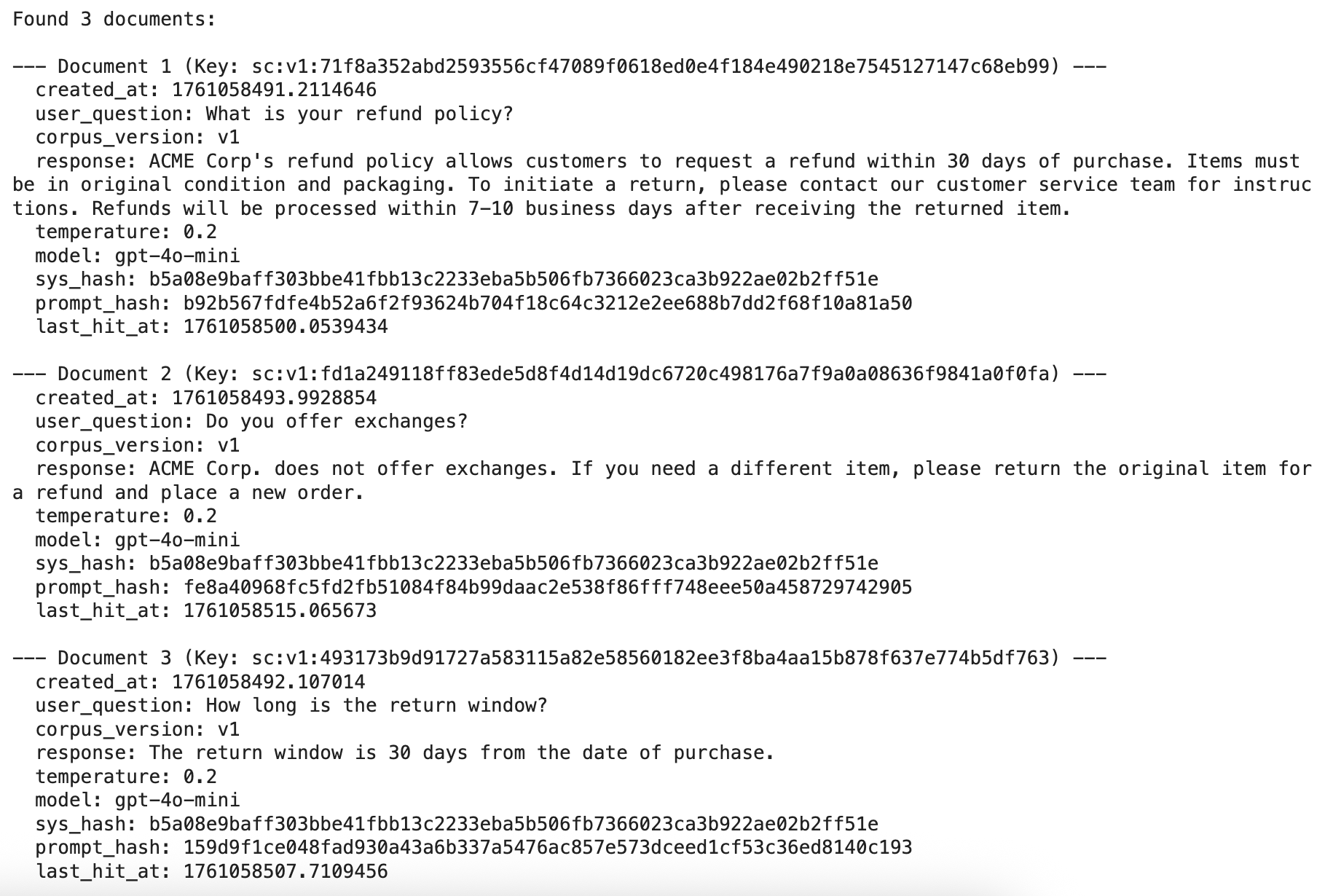
Test Paraphrases
This is the moment of truth. Let's throw some paraphrased versions at our cache and see if it recognizes them. If this works, we're avoiding unnecessary LLM calls.
paraphrases = [
    # Refunds
    "Could you explain your refund policy?",
    "Can you tell me how refunds work?",
    "How do I request a refund?",
    "Do you offer refunds if I'm not satisfied?",
    "How can I get my money back after a purchase?",

    # Returns
    "What is the timeframe for returns?",
    "How long is the return window?",
    "What’s the time limit to send something back?",
    "When does the return period expire?",
    "How many days do I have to return an item?",

    # Exchanges
    "Do you permit exchanges instead of refunds?",
    "Can I exchange a product I bought?",
    "Is it possible to swap an item for another?",
    "Do you allow exchanges for different sizes or colors?",
    "How do exchanges work in your store?",
]

print("\nTesting paraphrases...")
for p in paraphrases:
    print(f"\n--- Testing Paraphrase ---")
    print(f"Original: {p}")
    canonical_p = canonicalize(p)
    print(f"Canonicalized: {canonical_p}")

    # We don't want to polute the cache while testing
    res = answer(SYSTEM_PROMPT, p, add_to_cache=False)

    if res['source'] == 'cache':
        print(f"Result: CACHE HIT")
        print(f"  Cached Question: {res.get('user_question')}")
        print(f"  Distance: {res.get('distance'):.2f}") # Formatted to 2 decimal places
        print(f"  Latency: {res['latency_ms']:.1f}ms")
    else: # res['source'] == 'llm'
        print(f"Result: CACHE MISS (LLM Call)")
        print(f"  Latency: {res['latency_ms']:.1f}ms")
        if res.get('usage'):
             print(f"  Token Usage: Prompt={res['usage'].get('prompt_tokens')}, Completion={res['usage'].get('completion_tokens')}, Total={res['usage'].get('total_tokens')}")

        # Display closest match information found *before* the LLM call
        closest_info = res.get('closest_match_before_llm')
        if closest_info:
            print(f"  Closest match in cache (before LLM call):")
            print(f"    Original Cached Q: '{closest_info.get('user_question')}'")
            print(f"    Distance: {closest_info.get('distance'):.2f}") # Formatted to 2 decimal places
            print(f"    Current THRESHOLD: {THRESH:.4f}")
        else:
            print(f"  No close match found in cache (even with high threshold) before LLM call.")
Print Metrics
Time to see how we did. Plot those latency stats and check the cache hit rate. This is where you'll see the real impact of what we built.
import matplotlib.pyplot as plt
import numpy as np

# Get the snapshot of the metrics
metrics_snapshot = metrics.snapshot()

# Extract data for plotting
labels = ['Cache (P50)', 'Cache (P95)', 'LLM (P50)', 'LLM (P95)']
latency_values = [
    metrics_snapshot.get('p50_cache_ms'),
    metrics_snapshot.get('p95_cache_ms'),
    metrics_snapshot.get('p50_llm_ms'),
    metrics_snapshot.get('p95_llm_ms')
]

# Filter out None values if no cache hits or LLM calls occurred
filtered_labels = [labels[i] for i in range(len(latency_values)) if latency_values[i] is not None]
filtered_values = [value for value in latency_values if value is not None]

if not filtered_values:
    print("No latency data available to plot.")
else:
    # Create the bar chart
    x = np.arange(len(filtered_labels))
    fig, ax = plt.subplots(figsize=(8, 6))
    bars = ax.bar(x, filtered_values, color=['skyblue', 'deepskyblue', 'lightcoral', 'indianred'])

    # Add labels and title
    ax.set_ylabel('Latency (ms)')
    ax.set_title('Cache vs. LLM Latency (P50 and P95)')
    ax.set_xticks(x)
    ax.set_xticklabels(filtered_labels)
    ax.set_ylim(0, max(filtered_values) * 1.2) # Set y-axis limit

    # Add value labels on top of the bars
    for bar in bars:
        yval = bar.get_height()
        plt.text(bar.get_x() + bar.get_width()/2, yval + 5, f'{yval:.1f}', ha='center', va='bottom')

    # Display the plot
    plt.tight_layout()
    plt.show()

# Optionally, print the hit rate separately
print(f"\nCache Hit Rate: {metrics_snapshot.get('hit_rate', 0.0):.2f}")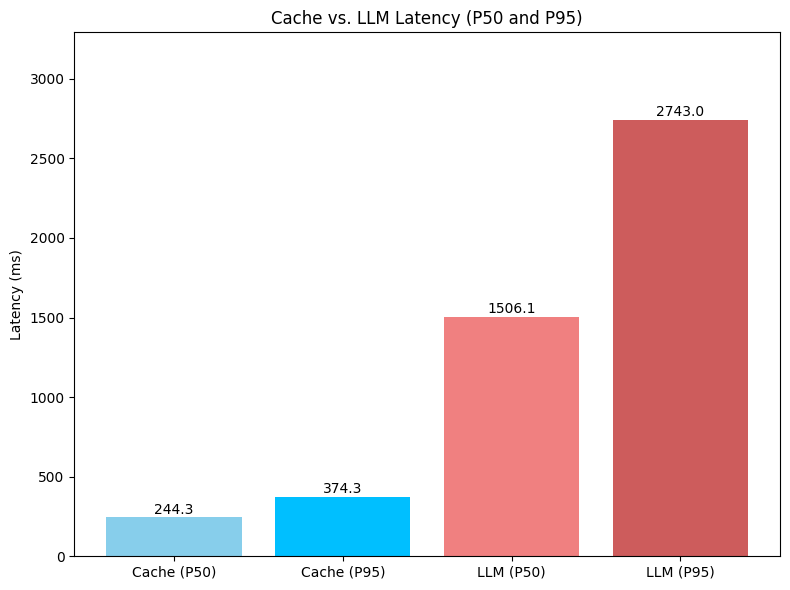
Conclusion
And there you have it – a production-grade semantic cache running on Redis Vector. The flow is simple: normalize → embed → vector search → serve cached response when it's "close enough."
In my testing, the results were pretty impressive:
Median (P50): 1506.1 ms → 244.3 ms (about 6.2× faster, roughly 84% reduction)
Tail (P95): 2743.0 ms → 374.3 ms (about 7.3× faster, around 86% reduction)
With a decent hit rate, you're looking at serious cost savings. Every cache hit is an LLM call you didn't have to make.
Key design choices
A few things I learned while building this:
Canonicalization is essential – it stabilizes keys across paraphrases.
HNSW delivers sub-100 ms vector search even at scale. I've tested this with thousands of entries.
Metadata gating (checking model, temperature, system prompt) prevents those weird moments where you get a cached response from a completely different context.
TTL plus namespace versioning gives you a safe way to invalidate things in bulk when needed.
Next Steps
Here's what I'm planning to work on next, and what you might want to consider:
Refine those similarity thresholds. I'm still analyzing paraphrase patterns to find the sweet spot between precision and recall.
Look into better embedding models. The quality of your embeddings directly impacts how well semantic clustering works.
Build up the cache coverage by indexing more rephrasings and related expressions for common queries. The more variations you have, the better your hit rate.
Add better observability. I want to monitor cache hit rates, latency percentiles, and similarity distributions over time. Data is everything.
Keep retrieval accuracy high through consistent metadata filtering and versioned namespaces. This helps isolate context shifts when your system evolves.
Actually, the more I think about it, the similarity threshold tuning is probably the most important next step. Get that right, and everything else falls into place.