How to Build a Multi-Agent Chatbot with CrewAI
Build a production-ready multi-agent chatbot with analyst and reviewer agents, ChromaDB RAG, CrewAI, and Gradio, delivering clearer, verified answers consistently.

Want to build a quick chatbot prototype? Let me show you something I threw together last week. Two agents, one finds info, the other checks it. Sounds fancy but it's actually pretty straightforward once you see how the pieces fit. If you want to understand how transformer models power advanced conversational AI, I've written a guide that breaks it all down.
Here's the basic idea. You need searchable docs. Load them, chunk them, make embeddings, store in a vector database. Your bot finds answers fast.
The two-agent thing? Agent 1 searches and answers. Agent 2 double-checks. Slap on a Gradio interface and you're done.

Set up
First, install stuff and get your API key working.
You'll need:
LangChain: Chains everything
CrewAI: Runs your agents
ChromaDB & LangChain-Chroma: Vector storage
LangChain-OpenAI: OpenAI models
Markdown: Text formatting
Gradio: The UI
Tqdm: Progress bars
Install:
pip install langchain langchain_chroma tqdm markdown langchain_openai chromadb crewai[tools] gradioAPI key:
from dotenv import load_dotenv, find_dotenv
_ = load_dotenv(find_dotenv())
Create the Index
I'm using markdown files from a Bank of Canada report I summarized. Got your own? Skip this bit.
Put your markdown files in a folder. The indexer loads them, chunks them, makes embeddings, stores everything. Actually, if you're interested in alternative approaches to building chatbots that leverage structured data, I wrote about building a knowledge graph chatbot with Neo4j and GPT-4o.
Here's the code:
!ls markdown_files'Bank of Canada Quarterly Financial Report – First Quarter 2023.md'
'Bank of Canada Quarterly Financial Report – First Quarter 2024.md'
'Bank of Canada Quarterly Financial Report – Second Quarter 2023.md'
'Bank of Canada Quarterly Financial Report – Second Quarter 2024.md'
'Bank of Canada Quarterly Financial Report – Third Quarter 2023.md'
'Bank of Canada Quarterly Financial Report – Third Quarter 2024.md'!head -15 'markdown_files/Bank of Canada Quarterly Financial Report – First Quarter 2023.md'# Bank of Canada Quarterly Financial Report – First Quarter 2023
**For the period ended March 31, 2023**
## Financial Position Overview
As of March 31, 2023, the Bank of Canada's total assets were **$374,712 million**, a **9% decrease** from **$410,710 million** on December 31, 2022. This reduction was primarily due to the maturity of investments. citeturn0search0
### Asset Breakdown
- **Loans and Receivables**: Held steady at **$5 million**, unchanged from December 31, 2022.
- **Investments**: Decreased by **9%** to **$344,766 million**, driven mainly by:
- **Government of Canada Securities**: Declined due to bond maturities.
- **Securities Repo Operations**: Reduced as the volume of these operations decreased.Load and Split the Documents
Load your docs. Split into chunks. This helps the bot find specific info quickly.
Like this:
from langchain_chroma import Chroma
from langchain_openai import OpenAIEmbeddings
from langchain_community.document_loaders import DirectoryLoader, TextLoader
from langchain.text_splitter import MarkdownHeaderTextSplitter, RecursiveCharacterTextSplitter

class MarkdownProcessor:
    def __init__(self, folder_path, file_pattern="./*.md"):
        self.folder_path = folder_path
        self.file_pattern = file_pattern
        self.loaded_docs = []
        self.chunks = []
        self.split_headers = [
            ("#", "Level 1"),
            ("##", "Level 2"),
            ("###", "Level 3"),
            ("####", "Level 4"),
        ]

    def load_markdown_files(self):
        loader = DirectoryLoader(
            path=self.folder_path,
            glob=self.file_pattern,
            loader_cls=TextLoader,
        )
        self.loaded_docs = loader.load()
        print(f"Documents loaded: {len(self.loaded_docs)}")

    def extract_chunks(self):
        markdown_splitter = MarkdownHeaderTextSplitter(
            headers_to_split_on=self.split_headers,
            strip_headers=False
        )
        chunk_splitter = RecursiveCharacterTextSplitter(
            chunk_size=250,
            chunk_overlap=30
        )

        for doc in self.loaded_docs:
            markdown_sections = markdown_splitter.split_text(doc.page_content)

            for section in markdown_sections:
                # Keep metadata from the original document and add a custom tag
                section.metadata = {
                    **doc.metadata,
                    **section.metadata,
                    "tag": "dev"
                }

            chunks = chunk_splitter.split_documents(markdown_sections)
            self.chunks.extend(chunks)

            print(f"Markdown sections for this doc: {len(markdown_sections)}")
            print(f"Chunks for this doc: {len(chunks)}")

        print(f"Total chunks created: {len(self.chunks)}")

# Run the processing
markdown_processor = MarkdownProcessor(folder_path="./markdown_files")
markdown_processor.load_markdown_files()
markdown_processor.extract_chunks()
Documents loaded: 6
Markdown sections for this doc: 11
Chunks for this doc: 34
Markdown sections for this doc: 11
Chunks for this doc: 32
Markdown sections for this doc: 11
Chunks for this doc: 32
Markdown sections for this doc: 9
Chunks for this doc: 25
Markdown sections for this doc: 12
Chunks for this doc: 37
Markdown sections for this doc: 12
Chunks for this doc: 38
Total chunks created: 198markdown_processor.chunks[3]Document(metadata={'source': 'markdown_files/Bank of Canada Quarterly Financial Report – First Quarter 2023.md', 'Level 1': 'Bank of Canada Quarterly Financial Report – First Quarter 2023', 'Level 2': 'Financial Position Overview', 'Level 3': 'Asset Breakdown', 'tag': 'dev'}, page_content='### Asset Breakdown \n- **Loans and Receivables**: Held steady at **$5 million**, unchanged from December 31, 2022. \n- **Investments**: Decreased by **9%** to **$344,766 million**, driven mainly by:')Create the Vector Store
Take those chunks, make embeddings, store in ChromaDB. Works great for this. While vector databases like ChromaDB work well, you can boost accuracy even more by improving retrieval accuracy with cross-encoder reranking. I explained this technique in an article on RAG optimization.
Setup:
from langchain_chroma import Chroma
from langchain_openai import OpenAIEmbeddings

class VectorStoreBuilder:
    def __init__(self, documents, storage_path='_md_db'):
        self.documents = documents
        self.storage_path = storage_path
        self.vector_store = None

    def build_and_save(self):
        """Creates and persists a Chroma vector store."""
        embedder = OpenAIEmbeddings()
        self.vector_store = Chroma.from_documents(
            documents=self.documents,
            embedding=embedder,
            persist_directory=self.storage_path
        )
        print(f"Stored {len(self.vector_store.get()['documents'])} documents in vector store.")

# Build and save the vector store from the chunks created earlier
vector_builder = VectorStoreBuilder(documents=markdown_processor.chunks)
vector_builder.build_and_save()
Stored 198 documents in vector store.Create the Tools
Now the agents need tools. For more on building flexible and reliable tools for CrewAI agents, including when to use decorators, BaseTool, or payloads, check out my guide.
CrewAI makes this easy:
from crewai.tools import tool
from typing import List
from langchain_openai import OpenAIEmbeddings
from langchain_chroma import Chroma

# ATTENTION: Ensure you use type annotations correctly, or the tools won't function properly.

# Tool for searching relevant information from the vector store
@tool("Search tools")
def search_tool(query: str) -> List:
    """
    Use this tool to retrieve relevant information to answer user queries.

    Args:
        query (str): The query used to search the vector store.

    Returns:
        List[Document]: Top-k documents matching the query.
    """
    storage_path = 'md_db'  # Confirm this matches the path used above
    k = 10
    embedder = OpenAIEmbeddings()
    vector_store = Chroma(persist_directory=storage_path, embedding_function=embedder)
    results = vector_store.similarity_search(query, k=k)
    return results

# Tool for asking clarifying questions
@tool("Ask for clarifications")
def ask_for_clarifications(question: str) -> str:
    """Prompt the user for clarification."""
    print(f"{question}")
    user_clarification = input()
    return user_clarification
Create the Multi-Agent Crew
Two agents:
Analyst: Finds and writes answers
Reviewer: Checks the work
Set them up:
from crewai import Agent, Task, Crew

# Define the Analyst agent
analyst_agent = Agent(
    role="Conversational Research and Analysis Specialist",
    goal="Interpret user requests, perform detailed research using the search tool, and compile comprehensive answers with reference documents.",
    backstory=(
        "With extensive experience in analytical research and data-driven insights, "
        "you excel at breaking down complex queries, conducting targeted searches, "
        "and synthesizing data into clear responses. Your methodical approach ensures "
        "accuracy and comprehensiveness in every answer."
    ),
    verbose=True
)

# Define the Reviewer agent
reviewer_agent = Agent(
    role="Quality Assurance and Final Review Specialist",
    goal="Carefully review and refine the initial responses, correct inaccuracies, and deliver a final answer meeting high standards of quality and clarity.",
    backstory=(
        "With a keen eye for detail and extensive experience in quality control and content review, "
        "you detect inconsistencies, validate sources, and polish answers. "
        "Your meticulous approach ensures every final response is accurate, clear, and insightful."
    ),
    verbose=True
)

# Define the Analyst task (be cautious with the clarifications tool to avoid repetitive questioning)
analyst_task = Task(
    description="""# Follow these step-by-step instructions:
1. Understand the user request: Read and analyze thoroughly, taking conversation history into account.
2. [OPTIONAL] Only ask for clarifications if the request is unclear or not specifically about these topics:
   - Bank of Canada Quarterly Financial Report
     - Financial Position Overview
       - Asset Breakdown
       - Liabilities and Deficiency
     - Results of Operations
       - Interest Revenue and Expense
       - Operating Expenses
       - Comprehensive Income
     - Financial Plan
     - Operational Highlights and Changes
     - Risk Analysis
3. Use the search tool repeatedly as needed to collect relevant information.
4. Perform any necessary calculations or analyses.
5. Synthesize gathered data into a comprehensive response.
6. Provide a detailed answer supported by references.

# Conversation history:
```{conversation_history}```

# User request:
```{user_request}```

# IMPORTANT:
- You MUST only use information found via the search tool.
- Do NOT rely on external knowledge.
""",
    expected_output=(
        "A well-structured markdown-formatted answer, detailed and supported by reference documents and data. "
        "DO NOT include triple backticks around the markdown. DO NOT include additional comments. Just respond with markdown."
    ),
    agent=analyst_agent,
    tools=[search_tool, ask_for_clarifications]
)

# Define the Reviewer task
reviewer_task = Task(
    description=(
        "Follow these step-by-step instructions:"
        "1. Review the Analyst's answer carefully."
        "2. Identify any errors, inconsistencies, or gaps."
        "3. Refine and correct the response to enhance clarity and accuracy."
        "4. Provide a polished final answer."
    ),
    expected_output=(
        "A finalized markdown-formatted answer ready for delivery. "
        "DO NOT include triple backticks around the markdown. DO NOT include additional comments. Just respond with markdown."
    ),
    agent=reviewer_agent,
    context=[analyst_task]
)

# Create the Crew with both agents and tasks
analyst_crew = Crew(
    agents=[analyst_agent, reviewer_agent],
    tasks=[analyst_task, reviewer_task],
    verbose=False
)
Test your crew
inputs = {
    "conversation_history": "",
    "user_request": "Tell me about Liabilities and Deficiency in 2023"
}
result = analyst_crew.kickoff(inputs=inputs)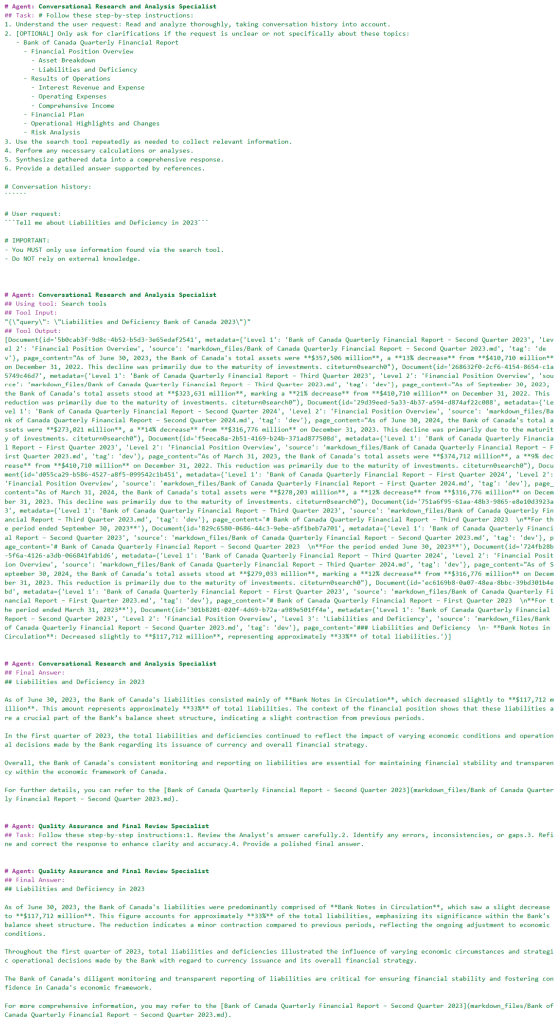
Create the UI with Gradio
Last step. Gradio for the interface. Takes messages, runs agents, shows responses.
Here:
import gradio as gr
from gradio import ChatMessage
import time

def analyst_chat(message, history):
    start_time = time.time()

    # Initial thinking indicator
    response = ChatMessage(
        content="",
        metadata={"title": "_Thinking_ step-by-step", "id": 0, "status": "pending"}
    )
    yield response

    # Prepare the inputs for the crew
    inputs = {
        "conversation_history": history,
        "user_request": message
    }

    # Kick off the multi-agent workflow
    result = analyst_crew.kickoff(inputs=inputs)

    # Update the thinking status
    response.metadata["status"] = "done"
    response.metadata["duration"] = time.time() - start_time
    yield response

    # Return the final agent response
    response = [
        response,
        ChatMessage(
            content=result.raw
        )
    ]
    yield response

# Launch the Chat Interface
demo = gr.ChatInterface(
    analyst_chat,
    title="Analyst Chat",
    type="messages",
    flagging_mode="manual",
    flagging_options=["Like", "Spam", "Inappropriate", "Other"],
    save_history=True
)

# Remember: Restart kernel each time you make changes to reflect them
demo.launch()
* Running on local URL: http://127.0.0.1:7860
To create a public link, set `share=True` in `launch()`.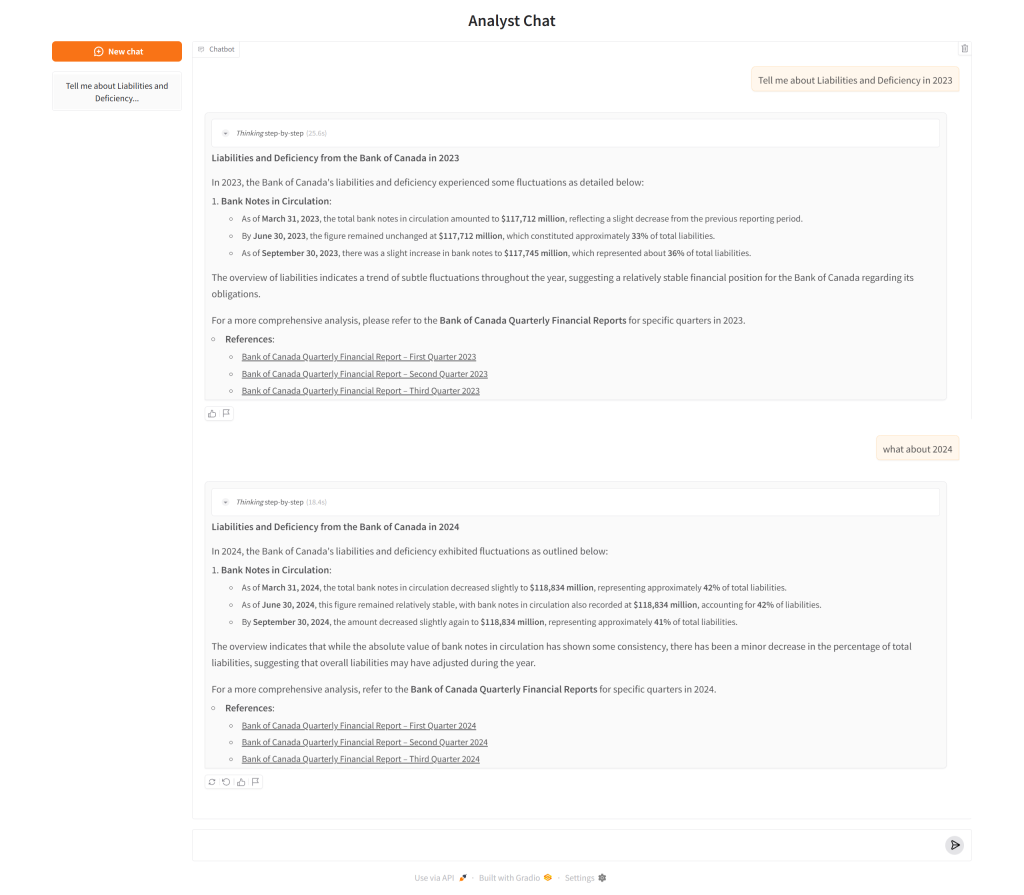
Conclusion
Honestly, Gradio makes this so easy. Point it at a Python function and you're basically done. Since it's just Python, you can do whatever you want with the logic.
This prototype shows how simple it is to connect agents with Gradio. Analyst finds stuff, Reviewer checks it. Together they handle real questions pretty well.
Next I want to try streaming agent thoughts to the UI. And maybe let agents ask clarifying questions. As you explore features like dynamic questioning and richer conversational flows, you might benefit from advanced prompt engineering and in-context learning techniques to refine your chatbot's responses. Should make things more transparent. That's what matters.